

Cerulion Studio is not open source and has no public download. Book 15 minutes with us to get access. The CLI it drives is open source; see Installation. For what Studio is, see Cerulion Studio.
Before you start
Studio drives the samecerulion CLI you use in a terminal, so the CLI has to be installed and on your PATH. If it is somewhere else, set its path in the sidebar’s settings block — Studio tells you which path it tried when it cannot find it.
Attach a topic
1
Run a graph
2
Scan for topics
Studio’s Topics sidebar lists what it found. Topics on this machine’s shared memory are under This machine; topics from robots it discovers on your network are grouped by robot. The refresh button re-scans.
3
Check the topic you want
Each row has a toggle. Checking it attaches the topic; the stage switches from its empty state to the live scene, and the row shows the archetype and schema the frames were decoded as. Unchecking it detaches the topic again.
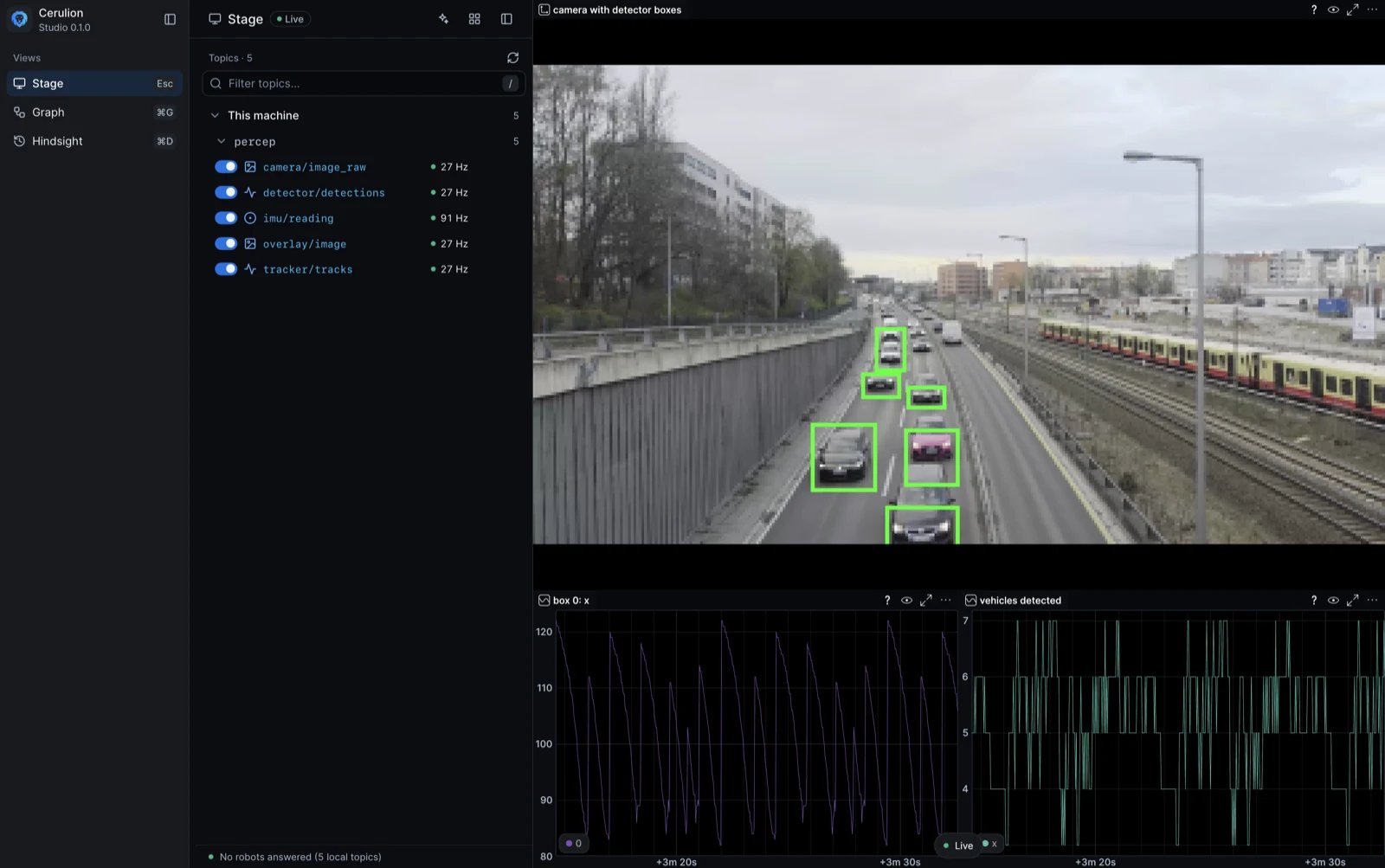
A checked camera topic on the stage, with detector boxes and plots.
Watch a remote robot
A robot on your network appears under Robots with its topic count and locator. Connecting to it pulls its topics to your desk: the frames are re-injected into your machine’s shared memory and decoded here, so the robot ships raw bytes and nothing else. The first connection to a robot needs pairing. Studio prompts for the pairing code shown for that robot, and remembers the result. A robot that discovery cannot reach can be connected by endpoint id instead, from the sidebar’s Connect a robot by endpoint id field.Verified robots carry a live indicator; unverified candidates are labelled as such, so a name discovered on the network never reads as a confirmed-online robot.
Watch a recording
Playback publishes onto local shared memory, so a bag playing back is indistinguishable from a live robot as far as Studio is concerned. Play the bag in a terminal:The viewer outlives the app
Studio does not own the decoding. A long-livedcerulion-vizd daemon owns the taps, the decode, and the scene; Studio starts it if it is not already running and speaks to it over a socket. The daemon is started detached, so it keeps running after you close Studio — reopening the app reattaches to the same scene instead of rebuilding it.
That also means the daemon is shared: Studio, a terminal, and the Studio agent can all attach topics to the same scene.
Next steps
Investigate a recording
Hindsight names the moment a recorded run went sideways, and cites the messages.
Cerulion Studio
The stage, the Graph view, and the agent dock.
Inspect topics
topic list, echo, and hz for the questions a viewer does not answer.Reach remote robots
Pairing, discovery, and pulling a robot’s topics to your desk.
Get access
Studio is available to teams by request. Tell us about your robot and we’ll set you up.Request access to Studio
Book 15 minutes. Bring your robot, your graph, or a recording you want to investigate.