

Hindsight is not open source and has no public download. Book 15 minutes with us to get access. Recording and replay stay in the open-source CLI —
cerulion bag record, bag play, and bag play --resim all --verify work without Hindsight.
What Hindsight does
Indexes a recording
Builds a read-only index of an MCAP bag on your machine, and reuses it while the bag is unchanged.
Gives a debrief
A deterministic summary of gaps, dropouts, and latency spikes, and the time the run went sideways. It runs offline.
Finds anomalies
Lists what it detected, worst first, each at the exact time it happened.
Cites every claim
Each finding points at a topic and a timestamp in the recording, so you can check it against the messages.
In Studio
In Cerulion Studio, open the Hindsight screen (⌘ D) and pick an.mcap bag. Hindsight indexes it and Studio shows a headline — the time the run went sideways, or that nothing did — and one item per moment. Click a moment to see the messages it cites.
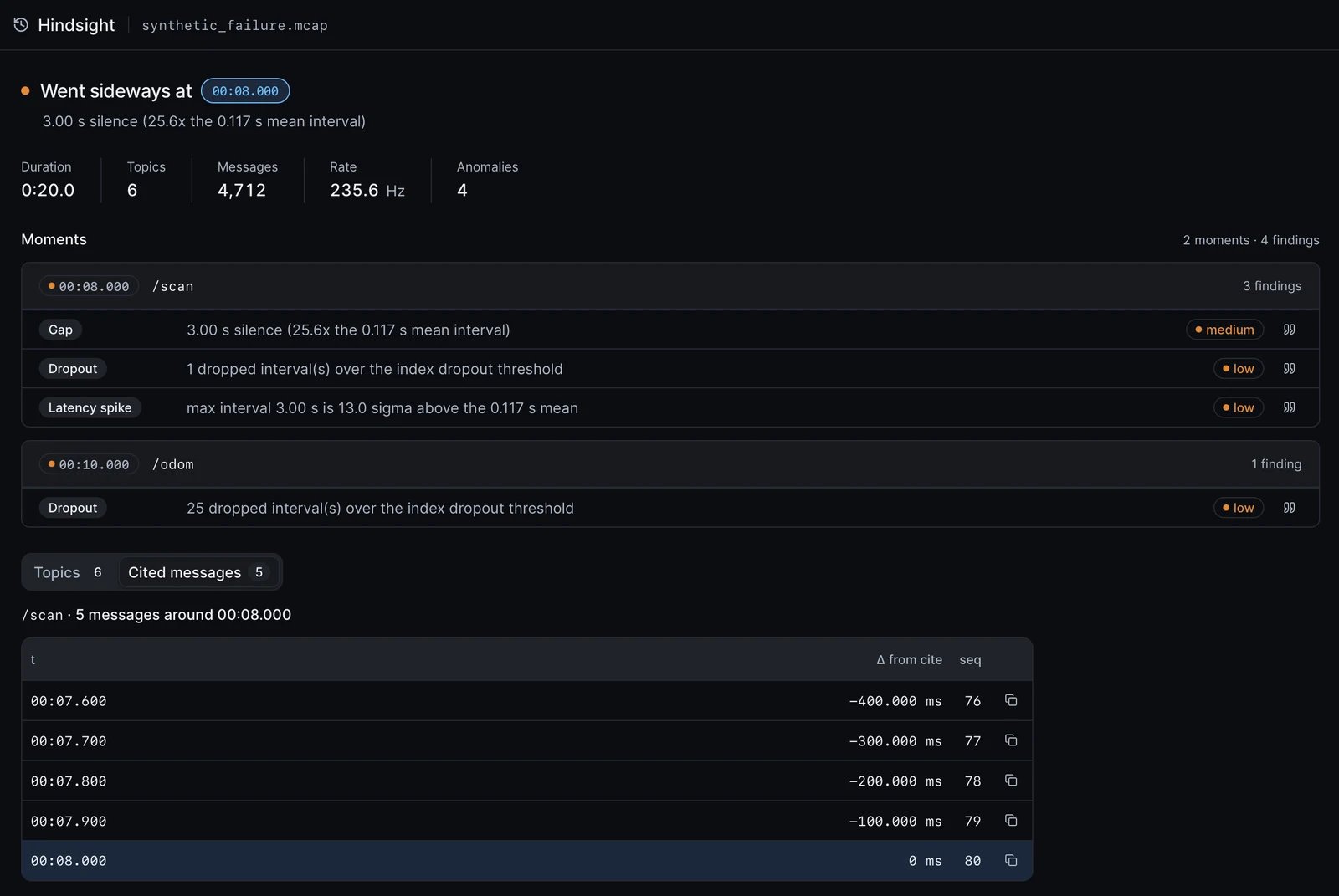
The Hindsight screen on a recording: the run went sideways at 8.0 s, when the /scan topic went silent for 3 seconds. Each finding has a severity, and the cited messages show the last scan before the gap.
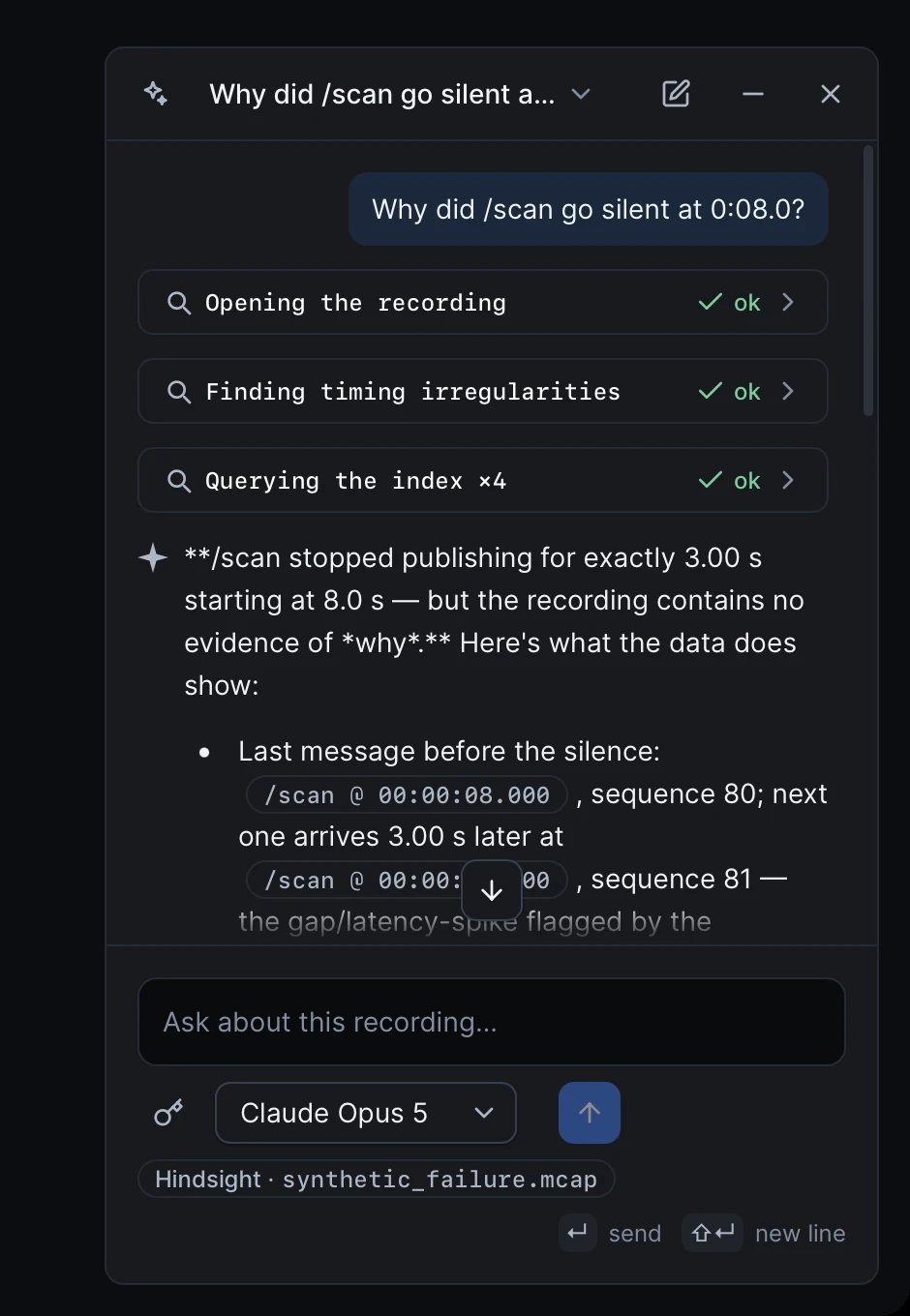
The agent dock answers a question about the recording. It runs Hindsight's tools, cites topics and timestamps, and says what the recording cannot show.
hindsight binary, which is not inside the Studio app. Studio looks for it on your PATH and in the usual install folders, such as ~/.cargo/bin and /opt/homebrew/bin.
With your AI agent
Hindsight also runs as an MCP (Model Context Protocol) server over stdio, so Claude Code, Cursor, or Claude Desktop can investigate a recording for you. Your client runs the agent loop; the server itself needs no model and no cloud credentials. With thehindsight binary on your PATH, register it in Claude Code:
open_bag, which writes the index beside the bag:
This is a separate server from
cerulion_mcp, the open-source server in Connect an MCP client. You can register both.
Gotchas
- MCAP only. Hindsight reads
.mcaprecordings. Convert a ROS 1.bagor a ROS 2.db3first with themcapCLI:mcap convert recording.bag recording.mcap. - The first open of a large bag takes time. Indexing a multi-GB bag takes 1–2 minutes. If your MCP client has a short tool timeout, raise it, or the build is cut off mid-way.
- Claude Desktop does not inherit your shell
PATH. Give it the absolute path to thehindsightbinary, and setHINDSIGHT_BAG_DIRto your recordings folder soopen_bagwith no argument finds a bag. - The index lives next to the bag. Hindsight writes
<bag>.duckdband a zero-byte<bag>.duckdb.lockbeside the recording, so the folder must be writable. Leave the lock file in place. - Hindsight finds what the recording holds. It reads only the topics you recorded. Record the topics you want to investigate — see Record and replay a run.
Get access
Hindsight is available to teams by request. Bring a recording of a run that went wrong, and we’ll show you where.Request access to Hindsight
Book 15 minutes. We’ll set you up.